Microsoft 365 Direct Send and QR Code Phishing: Why Internal-Looking Emails Are Becoming a Bigger Threat
Most business owners know their employees should be careful with suspicious emails from the outside.
That is still important.
But what happens when the email looks like it came from inside your company?
That is the problem with a growing Microsoft 365 phishing tactic known as Direct Send abuse.
Attackers are taking advantage of a Microsoft 365 email feature that was originally designed for printers, scanners, business applications, and internal systems. When abused, this feature can allow a phishing email to appear as if it came from someone inside your organization.
The scariest part is this:
The attacker may not need to steal anyone's password first.
They may not need to hack into your Microsoft 365 account.
They may simply abuse the way certain Microsoft 365 mail settings accept unauthenticated internal-looking email.
That is why this is getting so much attention.
What Is Microsoft 365 Direct Send?
Microsoft 365 Direct Send is a feature in Exchange Online that allows devices and applications to send email to people inside your organization.
It is commonly used for things like:
- Printers and scanners
- Internal business applications
- Monitoring systems
- Automated alerts
- Older line-of-business software
- Building systems or legacy devices
For example, a copier may use Direct Send to email a scanned document to an employee.
That sounds harmless, and in many cases it is. Direct Send exists because many older devices and applications were not built to sign in securely the way a modern user does.
The problem is that Direct Send can allow certain messages to be sent without normal mailbox authentication.
That convenience has now become a security concern.
How Attackers Are Abusing Direct Send
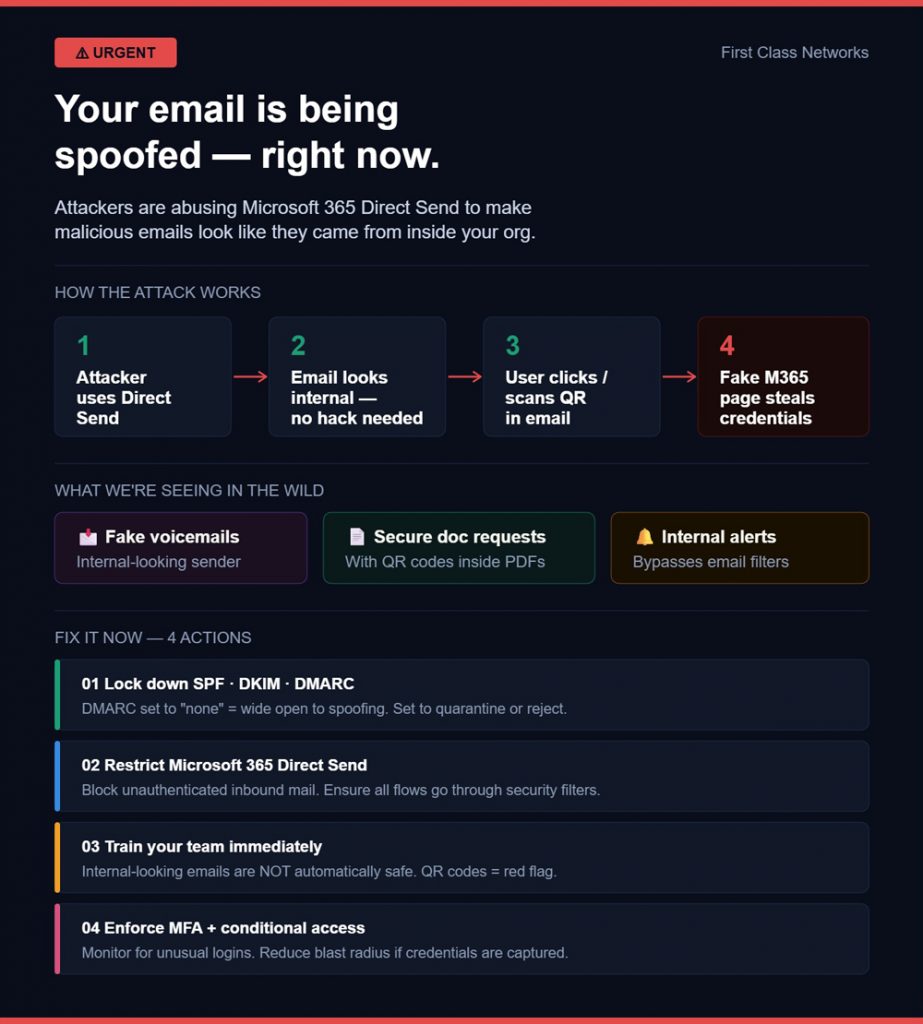
Attackers are using Direct Send to send phishing emails that look like they came from internal users.
An employee might receive an email that appears to come from:
- Themselves
- A coworker
- A manager
- The IT department
- A shared mailbox
- A familiar internal system
The email may say something like:
- You have a new voicemail.
- New fax received.
- Scanned document attached.
- Payment notice available.
- Action required for your Microsoft account.
- Please review this secure message.
In many of these attacks, the message includes a PDF attachment or an embedded QR code. When the employee scans the QR code, they are taken to a fake Microsoft 365 login page.
From there, the attacker tries to steal the employee's username, password, and sometimes multi-factor authentication approval.
Why QR Codes Make This Worse
QR-code phishing has become a major problem over the last few years.
This type of attack is sometimes called quishing.
The reason attackers like QR codes is simple. A QR code can move the attack away from the employee's protected work computer and onto their personal phone.
That matters because a personal phone may not have the same security controls as the company computer.
Many traditional email filters are also better at checking normal links than they are at analyzing QR codes inside images or PDF attachments. Security tools have improved, but attackers keep changing their tactics.
A QR-code phishing email often has very little text. That gives security filters fewer clues to analyze.
The employee sees a familiar-looking message, scans the code, and lands on what appears to be a normal Microsoft 365 login page.
But it is not Microsoft.
It is a credential-stealing site.
When Did This Become a Big Thing?
QR-code phishing started becoming a much bigger issue around 2023, especially as attackers realized they could use QR codes to bypass some traditional email protections.
Direct Send abuse became more visible as a serious Microsoft 365 issue in 2025.
Security researchers began reporting active campaigns where attackers used Direct Send to target organizations with internal-looking phishing emails. These attacks were seen across many industries, with a strong focus on U.S.-based organizations.
If it feels like your business is seeing more of these right now, you are not imagining it. We are seeing a noticeable spike in these attacks as well.
These attacks are not rare anymore. They are becoming more common, more believable, and more dangerous for businesses that rely heavily on Microsoft 365.
Why Internal-Looking Emails Are So Dangerous
The biggest issue is trust.
Employees are usually more suspicious of an email from a random outside address.
But when an email looks like it came from inside the company, their guard drops.
That is exactly what attackers are counting on.
Most employees are busy. They are trying to get through their day. They are answering customers, handling invoices, reviewing documents, and responding to coworkers.
If an email looks routine, they may click before they think.
That is how a simple fake voicemail or fake scanned document can turn into a major security incident.
What Could Happen If Someone Falls For It?
A successful Direct Send or QR-code phishing attack can lead to serious problems, including:
- Stolen Microsoft 365 credentials
- Compromised email accounts
- Unauthorized access to company files
- Fake invoice or payment fraud
- Business email compromise
- Exposure of client information
- Ransomware risk
- Loss of trust with customers
- Downtime and recovery costs
Once an attacker gets into a Microsoft 365 account, they may quietly search through email, files, contacts, and Teams messages.
They may look for invoices, banking details, client conversations, passwords, or sensitive documents.
They may also use the compromised account to send more phishing emails to other employees, customers, or vendors.
That is when the damage can spread quickly.
Why This Matters for Small and Mid-Sized Businesses
Small and mid-sized businesses are especially vulnerable to this type of attack.
Not because they are careless.
It is because many smaller companies do not have a full-time cybersecurity team watching Microsoft 365 every day.
Attackers know this.
They know that many businesses use Microsoft 365 for email, files, calendars, Teams, SharePoint, OneDrive, and customer communication.
They also know that if they can compromise one user account, they may be able to get access to a lot more than just email.
That is why Microsoft 365 security needs to be reviewed and maintained. It is not something you set up once and forget.
Direct Send Is Not Always Bad
It is important to understand that Direct Send itself is not automatically malicious.
Many companies use it for legitimate reasons.
- A printer may need to scan documents to employees.
- An internal application may need to send alerts.
- A monitoring tool may need to notify staff.
- A business system may need to send status updates.
The risk comes from leaving this capability open or unmanaged.
The goal is not to break business workflows. The goal is to identify what is legitimate, secure it properly, and block what should not be allowed.
What Businesses Should Do Now
If your company uses Microsoft 365, this should be reviewed.
Here are the most important steps to take.
1. Find Out Whether Your Business Uses Direct Send
Start by identifying whether any devices, applications, or services are using Direct Send.
This may include:
- Copiers
- Scanners
- Printers
- Phone systems
- Building systems
- Monitoring tools
- Line-of-business applications
- Third-party platforms
- Old servers or scripts
Many businesses have old email-sending configurations that no one has looked at in years.
Before changing anything, your IT team should confirm what is still in use.
2. Block Unauthorized Direct Send Traffic
Microsoft now provides controls that can reject unauthorized Direct Send traffic.
This can help stop attackers from sending unauthenticated messages that pretend to come from your own domain.
However, this should be done carefully.
If legitimate printers, scanners, or business applications are using Direct Send, those systems may need to be updated before blocking it.
This is where planning matters.
The right approach is:
- Identify legitimate Direct Send usage
- Move systems to a more secure sending method where possible
- Create approved connectors where needed
- Block everything else
3. Review Third-Party Email Filtering
Some businesses use third-party email security tools in front of Microsoft 365.
That can be helpful, but it can also create a hidden problem if Exchange Online still accepts messages directly.
In simple terms, you may think all email is going through your security filter, but some messages may still be able to reach Microsoft 365 another way.
Your IT provider should confirm that Microsoft 365 is not accepting unapproved direct delivery that bypasses your filtering system.
4. Strengthen SPF, DKIM, and DMARC
SPF, DKIM, and DMARC are email authentication controls that help prove whether an email claiming to come from your domain is legitimate.
They are not magic, but they are important.
Weak or missing email authentication can make spoofing easier.
Every business using Microsoft 365 should have these controls reviewed and properly configured.
5. Train Employees Not To Trust Email Just Because It Looks Internal
This is one of the most important lessons.
Employees should be trained that internal-looking does not always mean safe.
They should be careful with:
- Unexpected QR codes
- Unexpected voicemail notices
- Unexpected fax notices
- Unexpected scan attachments
- Emails from themselves
- Emails asking them to log in again
- Messages with urgency or pressure
- Payment or banking requests
- Shared document links they were not expecting
The best rule is simple:
When in doubt, verify it another way.
Call the person. Send a Teams message. Ask IT. Do not click or scan first.
6. Treat QR Codes in Email as Suspicious
QR codes in email should be treated with caution, especially if they lead to a login page.
Employees should be told not to scan QR codes from unexpected emails.
This is especially true when the email claims to involve:
- Microsoft 365
- Password resets
- Voicemail
- Secure documents
- Benefits
- Invoices
- Payment approvals
- Multi-factor authentication
- Account verification
A QR code is just another form of a link. If you would not click a strange link, you should not scan a strange QR code.
7. Make Sure Multi-Factor Authentication Is Properly Configured
Multi-factor authentication is still one of the most important protections for Microsoft 365.
But it needs to be configured properly.
Basic MFA is better than nothing, but stronger options are better. Businesses should review whether they are using modern, phishing-resistant authentication options where possible.
Attackers are also getting better at tricking users into approving login prompts, so MFA should be combined with other protections.
8. Monitor for Signs of Internal Spoofing
Your IT or cybersecurity provider should watch for warning signs such as:
- Emails from a user to themselves
- Internal-looking emails from unusual locations
- Messages that fail authentication checks
- QR codes inside PDF attachments
- Unexpected voicemail or fax emails
- Repeated phishing emails with similar subjects
- Messages that bypass normal filtering routes
- Unusual login attempts after a phishing email is received
These signs should be investigated quickly.
9. Move Old Systems to Safer Email Sending Methods
If older devices or applications still need to send email, they should be reviewed.
In some cases, they can be moved to authenticated SMTP submission. In other cases, they may need a properly configured connector that only allows approved sending sources.
For high-volume automated email, newer Microsoft options may also be worth reviewing.
The key point is this:
Business systems should not be allowed to send email in a way that attackers can easily imitate.
The Business Impact Is Bigger Than One Email
This is not just an IT issue.
This is a business risk.
A single employee clicking one convincing email can lead to:
- A stolen mailbox
- A fraudulent wire transfer
- A client data exposure
- A ransomware incident
- A damaged reputation
- A long and expensive cleanup
And the email may not look suspicious at first glance.
It may look like it came from inside your own company.
That is what makes this so dangerous.
The Bottom Line
The days of blindly trusting internal-looking email are over.
Attackers are abusing Microsoft 365 Direct Send and QR-code phishing to make fake messages look more believable. These attacks have grown significantly over the last few years, and Direct Send abuse became a much bigger concern in 2025.
If your business uses Microsoft 365, now is the time to review your email security settings.
Do not wait until someone clicks.
Find out whether Direct Send is being used. Secure or replace old email-sending methods. Train employees on QR-code phishing. Strengthen Microsoft 365 protections. Monitor for internal spoofing.
A few proactive steps now can prevent a very expensive problem later.
Need Help Reviewing Your Microsoft 365 Security?
At First Class Networks, we help small and mid-sized businesses protect Microsoft 365 from phishing, account compromise, ransomware, and data theft.
If you are not sure whether your Microsoft 365 environment is properly secured, we can help you review your settings, identify risks, and give you clear next steps.
No scare tactics. No pressure. Just straight answers.
Frequently Asked Questions
What is Microsoft 365 Direct Send?
Microsoft 365 Direct Send is a feature in Exchange Online that allows devices and applications to send email to people inside an organization. It is often used by printers, scanners, monitoring tools, and older business applications.
Why is Direct Send a security risk?
Direct Send can be risky because some messages can be sent without normal user authentication. Attackers may abuse this to send phishing emails that appear to come from internal users or trusted company systems.
Does this mean Microsoft 365 was hacked?
No. In many Direct Send abuse cases, the attacker does not need to hack into Microsoft 365 first. They abuse an email-sending feature to make a message look internal.
What is QR-code phishing?
QR-code phishing, also called quishing, is a phishing attack that uses a QR code instead of a normal link. The QR code often sends the user to a fake login page designed to steal passwords.
Why are QR codes used in phishing emails?
Attackers use QR codes because they can move the user from a protected work computer to a personal phone. QR codes can also be harder for some traditional email filters to analyze, especially when they are embedded in images or PDF attachments.
When did QR-code phishing become a major issue?
QR-code phishing became a much bigger issue around 2023, when attackers started using it more heavily to bypass traditional email security tools. It continues to be a serious phishing tactic today.
When did Microsoft 365 Direct Send abuse become a bigger concern?
Direct Send abuse became more visible as a real-world threat in 2025, when security researchers reported active campaigns using it to send internal-looking phishing emails to organizations.
What are common signs of a Direct Send phishing email?
Common signs include emails that appear to come from yourself, unexpected voicemail or fax notices, QR codes in attachments, login requests, suspicious PDFs, and messages that create urgency.
Should businesses disable Direct Send?
Businesses should first determine whether they are using Direct Send for legitimate devices or applications. If Direct Send is not needed, it should be blocked. If it is needed, it should be restricted and secured properly.
Can First Class Networks help with this?
Yes. First Class Networks can review your Microsoft 365 security settings, email authentication, Direct Send exposure, phishing protections, and employee security awareness to help reduce the risk of these attacks.